Electronic Archiving and Qualified Digital Preservation

Turn incoming documents into trusted information with AI. Docbyte Vault connects intelligent document processing, automation and long-term preservation in one platform.

qualified trust service provider complaint with eidas whtie logo

Docbyte is a Qualified Trust Service Provider delivering Qualified Preservation and eArchiving for organisations across Europe and beyond.

Why Docbyte?

Put your information to work with Docbyte Vault. AI-assisted classification, extraction and validation turn incoming documents into usable records. Connect those records to your business workflows, preserve their integrity and give teams controlled access through Vault or a compatible AI assistant.

Qualified Preservation, eArchiving and lifecycle governance keep the record and its proof together for the long term.

Explore the main solution paths: secure document collection, digital mailroom automation, qualified electronic archiving and application retirement.

Trusted by regulated organisations in finance, insurance, healthcare, life sciences and the public sector.

Docbyte EU compliance lock

Qualified Trust Service Provider for Qualified Electronic Archiving, with qualified preservation services listed on the EU Trusted List.

oais cloud icon for digital preservation

OAIS aligned preservation.

docbyte vault feature icon

European data residency (or where you would like your data to reside).

Stay informed about trusted digital information

Practical insights on digital preservation, Qualified Electronic Archiving and the future of trustworthy records.

The problem: digital evidence often fails long before it is needed

Digital information is more fragile than many organisations realise. Signatures expire, formats become unreadable and systems are replaced. Information is often incomplete, poorly classified or stored in places that do not support long term trust. When a dispute, inspection or audit takes place, companies sometimes discover that records they relied on cannot be defended.

digital signature validation and compliance illustration

Why this is happening

Docbyte alert and risk icon

Information enters the organisation through many uncontrolled channels.

Docbyte alert and risk icon

Documents are stored in systems that were never designed for preservation.

Docbyte alert and risk icon

Manual classification or tagging is inconsistent or missing.

Docbyte alert and risk icon

Signed documents lose their evidential value when certificates expire.

Docbyte alert and risk icon

Legacy systems become unstable, too expensive to maintain or exposed to cyber incidents.

Docbyte on-premise data center

What this means for you

Organisations cannot rely on their information unless they can prove:

Docbyte unknown document icon

What the document is?

Docbyte unknown document icon

Where it came from?

Docbyte unknown document icon

That it has not changed.

Docbyte unknown document icon

And that all context and metadata remain intact.

Without this, the organisation carries legal, operational and reputational risk.

Docbyte missing document query

From active document to evidence ready record

Docbyte Vault connects to your existing landscape, captures important records and preserves them in a certified archive designed to remain ready for audits, investigations and long term use. This lifecycle reduces risk at each step and gives organisations a controlled and dependable preservation process.

Step 1: Collect

Capture documents from any source, including DMS, email, portals, scanners, business applications and external platforms. Vault Collect, Vault Ingest and our integration connectors ensure that information arrives in a clean, controlled and complete way. We remove guesswork at the point of entry.

Docbyte omnichannel capture workflow

Step 2: Process

Document classification, metadata extract, completeness checks, signature validation, format identification and other checks that prepare content for long term preservation.

Our intelligent document processing capabilities ensure that:

docbyte media playback icon

Documents are recognised automatically.

funnel icon for data filtering and extraction

Essential fields are extracted.

docbyte secure document folder

and the organisation knows exactly what it is preserving.

Docbyte eIDAS signing illustration

Step 3: Preserve

Convert documents into Archival Information Packages, seal them with evidence records and qualified timestamps and apply retention, legal holds and migration rules.

image showing docbyte secure records storage system

Step 4: Share

Provide secure and auditable access to internal users, auditors, inspectors and partners without exposing operational systems.

docbyte multi-factor access security

A standards based archive that supports legal certainty and solves real information problems

Docbyte Vault is not simply a storage platform. It is a certified preservation solution designed to maintain evidential value and trust in your records over the very long term.

docbyte validated legal document

Certainty

Legal-grade evidence for records preserved within the qualified service. Each document is preserved as an Archival Information Package with fixity checks, qualified timestamps and evidence records, so you can demonstrate its origin and integrity with qualified evidence.

sync icon for automated data updates

Continuity

Long term preservation and cyber resilience. Docbyte Vault keeps documents readable, renews evidence when technology changes and adds an additional resilience layer against cyber incidents. It preserves content independently of the original system and provides an independent resilience layer for critical information.

hand icon for interactive digital solutions

Control

Retention and access under full control. Retention rules, legal holds, audit grade deletion and attribute based access ensure preservation is aligned with legal, regulatory and operational needs.

See what happens to your records

Interpret incoming information

Use LLM-assisted reference extraction alongside validation and human review. Give teams the context they need before information enters the archive.

Run preservation through time

Schedule preservation actions, check integrity and maintain cryptographic evidence. Preserve originals alongside new representations so the history remains inspectable. Review the results for each package and keep the context needed to understand the record.

Find records and inspect their evidence

Search in Vault or use read-only MCP access to archive metadata with a compatible AI assistant, within your Vault access rights. Metadata handling follows your agreement with the selected AI provider. Manage retention and legal holds, then produce a sealed integrity report with a qualified timestamp for a recipient to verify.

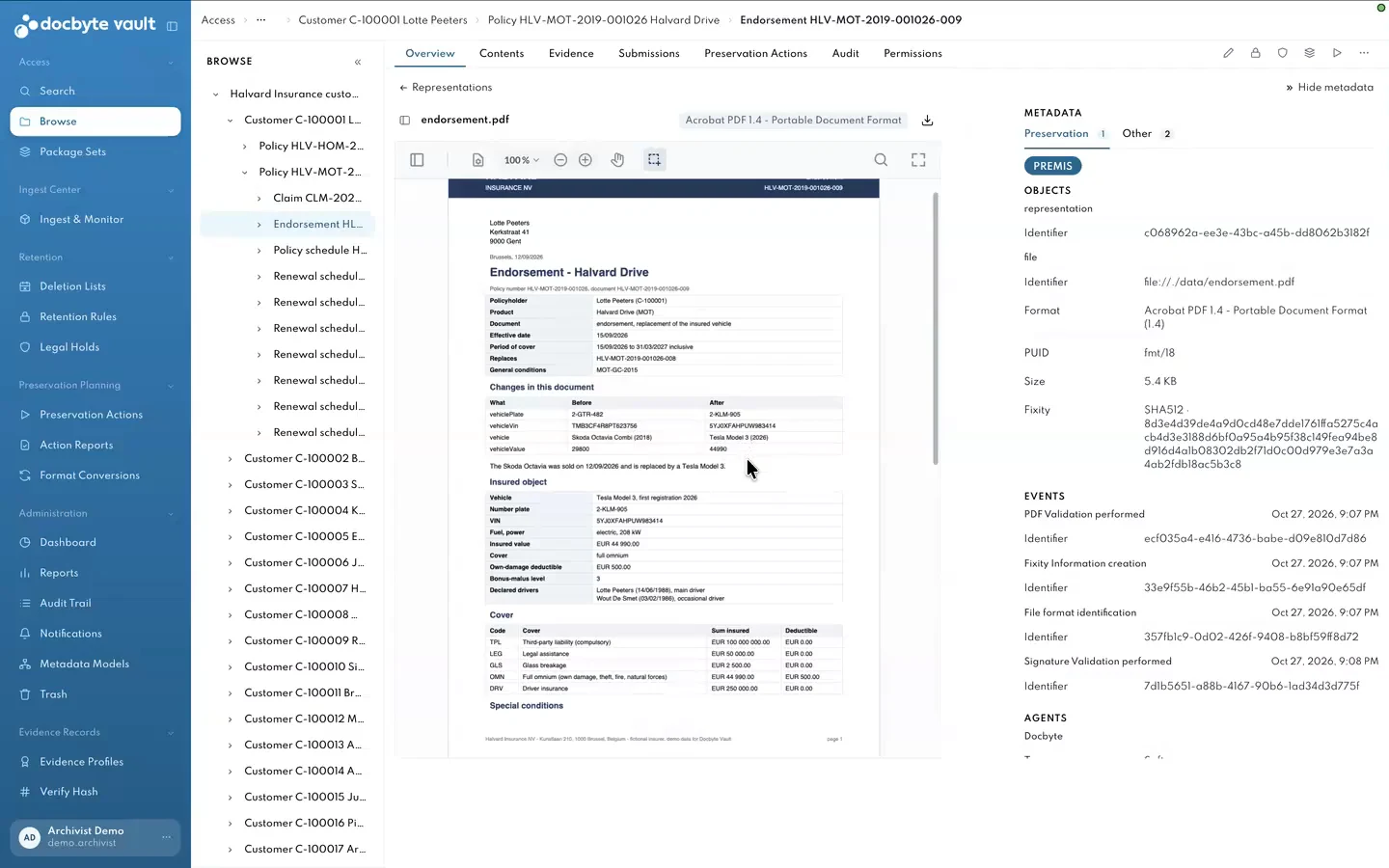
A preserved source document alongside its PREMIS metadata, fixity and recorded preservation events. Fictional demonstration data.
Inspect the original record and its preservation context in Docbyte Vault. Fictional demonstration data.

What you can achieve with Docbyte Vault

docbyte digital document signing

Preserve digitally signed contracts, agreements and consents with full evidential strength.

folder icon for digital document archiving

Archive policies, claims and underwriting files so that they support audits, disputes and investigations.

Docbyte system configuration icon

Retire legacy applications while keeping their records accessible and trustworthy.

docbyte document import workflow

Bring together documents from multiple systems into one evidence ready repository.

docbyte cloud sync icon

Maintain readability through format validation and migration over time.

docbyte verified process icon

Apply consistent retention and deletion rules and demonstrate compliance whenever needed.

Modules built for preservation

docbyte discovery and search icon

Vault Explorer

A simple interface that lets internal and external users find and view preserved records without revealing technical metadata.

image for vault admin

Vault Admin

Configure metadata models, retention schedules, legal holds, roles, permissions and audit settings. Monitor the health of the archive.

Docbyte secure processing module

Vault Ingest

Ingest high volumes of documents, transform them into SIPs and AIPs and validate their structure before accepting them into the archive.

docbyte featured feedback icon

Vault Review

Add human oversight where needed. Review and correct classification and metadata before content becomes part of the permanent archive.

docbyte download action icon

Vault Collect

Allow users or business processes to upload documents directly in a secure and guided way. Vault Collect ensures completeness, applies basic checks and supports clean and consistent intake from distributed channels.

How Docbyte Vault helps different roles in your organisation

Docbyte compliance checklist icon

For compliance officers

Docbyte download warning icon

For risk managers

docbyte user settings icon

For IT and information management

What customers gain with Docbyte Vault

Docbyte incident response chat

Faster and more confident responses during audits and inspections.

docbyte maintenance update icon

Reduced dependency on old systems and manual processes.

shield icon for secure user access management

A clear and defensible preservation approach for regulators and risk teams.

docbyte document review icon

Less effort required for retention, deletion and evidence collection.

See Docbyte Vault in action

Product overview and technical appendix for OAIS and ETSI alignment.

Legal and compliance brief on Qualified Electronic Archiving.

Industry guides for finance, insurance, public sector and life sciences.

Ready to protect your evidence

Talk to our team about how Docbyte Vault fits into your organisation and compliance needs.